Conditional Formatting is one of the features that takes Excel from a simple spreadsheet tool to an application builder. Depending on the value of a cell, you can change the formatting of that cell. Formatting in cells can also be conditional based off of the values in another cell or the results of a calculation. This is done dynamically saving the user the trouble of changing the format themselves.
I use conditional formatting in Excel to track things like invoicing. With conditional formatting, I can tell at a glance which clients of mine owe money and which ones are paid up. I also use different coloring for charges and deposits.
Less than, greater than, and equals a number
In this tutorial, we will set up cells to be highlighted based on whether or not they are less than, greater than, or equal to zero. We’ll make cells change colors based off of this condition.
Let’s get started.
1. Open a new Excel file.
2. Type in some sample numbers in a column. In my sample, I have typed 0, -1, and 1. When we’re finished with the tutorial, our sample file will show the conditional formatting in action immediately. In column C, I have typed descriptions on which color the cells should be.
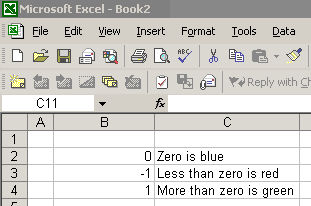
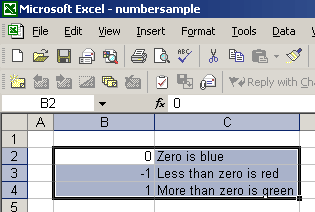
3. Select the cells you want to be affected by the conditional formatting. In this example, I have selected B2, B3, B4, C2, C3, and C4.
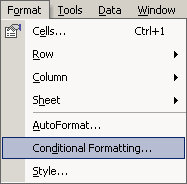
4. Go to Format > Conditional Formatting…

The Conditional Formatting box will appear.
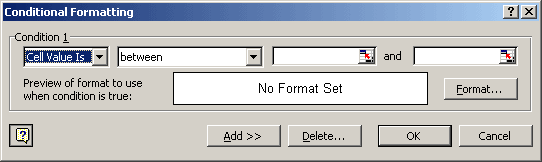
5. In this box, change Condition 1 to “Formula Is”.
6. Then type “=$B2=0″ without the quotation marks. This is saying that if the cell in this row that resides on the B column is equal to zero, then the conditional formatting will be applied.
7. Click Format… to specify the format applied when the condition is true. The format can include font, cell color, borders, and more.
In this example, I set the formatting to color the cell blue.
8. Click Add >> to add another row in the Conditional Formatting box.
9. Repeat steps 5 through 7 twice. Specify different formatting options and use the following formulas: “=$B2<0″ and “=$B2>0″. When you’re done, your Conditional Formatting box should look like the sample below.
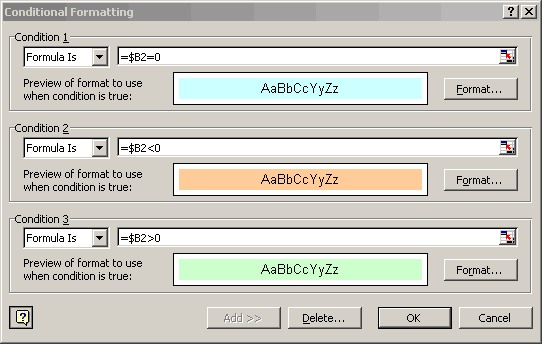
10. When you are done, click OK and your Excel file should look like the example below.
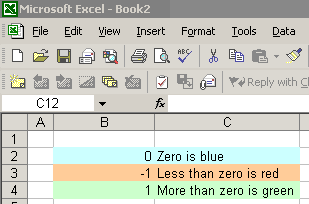
If the formatting didn’t work, go over the steps to determine what you did wrong. If you get really lost, you can download the sample:
Other possibilities
The possibilities are almost endless with conditional formatting. Instead of using “Formula Is”, you can use “Cell Value Is”. From there, you can specify what the cell value should be equal to, should not be equal to, should be between, etc.
Sadly, you are limited to only three possible conditions on any given cell.
If you are going to be using alpha characters instead of numeric characters, the alpha characters must reside within quotation marks in your formula. For example: =$B2=”Scott”.
There are the basics of conditional formatting in Excel. If you use this tutorial in a project, post your story here. You might spark some ideas in other readers.

{ 52 comments… read them below or add one }
Is it possible to conditonally format a cell when it has a calculation in it. Let’s say I have an AVR calc for several lines. Can I conditionally format that cell to say if the the average is greater than 5 color the cell green?
Eileen, it is possible. If you follow the same instructions on this page, Excel will conditionally format a cell with a calculation the same way it will format a cell with a static number.
thanks
What formula can I use when I want to have a cell look at 2 other cells and pick the higher (or lower) of those two?
Thanks!
Kevin, the following assumes that the two cells are B1 and B2.
=MAX(B1:B2)Use the following to return the lowest value.
MIN(B1:B2)Thanks, Scott.
That was exactly what I was looking for.
If I want to just select individual cells and find the largest or smallest, just add a comma between then different cells or control-alt-select each one.
Kevin, if the cells are connected, then you can use the following code, which will use B1, B2, and B3 in the formula.
=MAX(B1:B3)If the cells are not connected, then you will need to separate the groups of connected cells with a comma. The following will use B1, B2, B3, and C5 in the formula.
=MAX(B1:B3,C5)I have another roadblock that is tying me up.
=IF(M142<25%,M142,25%)
I need to also somehow reference that if M142 is zero, then the new cell value is 25% minimum.
Any suggestions?
Hi Scott!
Thanks a lot! It is just great! Since yesterday night I was trying to change cell background colour based on condition. I have a question, if I have a conditional statement, is it possible to get the result in form of binary or Boolean value 0 or 1?
Saurav, if I am understanding you correctly, then yes, it is possible. However, you would not use conditional formatting for the job. Instead, you would use a formula in another cell.
For example, if your value is in A1 and B1 will display the Boolean value, your formula may look like this:
=IF(A1>10,1,0)This formula looks at A1 and determines if the value is greater than 10. If the value is greater than 10, the formula displays 1. Otherwise, it displays 0.
I hope that helps.
How can I format a cell so that it equal anumbe r…example
If cell C is 53 or above I want cell D – to show the number 23.
If Cell C is 53 or less I want Cell D to be 16
Dale, you can use the following formula to do what you are asking.
=IF(C1>=53,23,16)Thanks alot
I have a workbook with links between pages. The first page is my “Input” page where the information is imported from another program. That info there then fills in specific cells on different pages based on the layout desired by the client. On my client page, I need the cell to read the “input” cell as a date, but then reference the cell as either OPEN or CLOSED if there is a date shown that is before today’s date. Something along the lines of:
=IF(Input!V2=<TODAY,CLOSED,OPEN) … but that didn't work.
Any suggestions out there?
Kevin, when you reference TODAY, you need parentheses afterward. In addition, non-numeric values require quotation marks around them.
=IF(Sheet2!V2=TODAY(),"CLOSED","OPEN")I hope that helps.
I have a spread sheet that has a list of six peoples names in Column B and a list of items they sold in Column E
At the top of the spread sheet I each persons name . I want to have the names of the spread sheet populate based off of how many items each person sold.
Example,,, if Tom sold 8 items I want The sell beside Toms name at the top of the sheet to be filled in with the number 8.
I know i can filter to find this out, but I want to have each persons totals show at the top as well. Please help
Hi Dale, it sounds like you can do a simple countif on the B column. I assume that anytime Tom’s name appears, it means he sold an item. As such, the following will return every instance where Tom sold something.
=COUNTIF(B1:B100,"Tom")Be sure to modify the B1:B100 range to the appropriate range.
Dale, you’ve been wonderful in answering all of the above and I have the same problem with a little quirk. I want Cell S5 to turn red is Cell S4 = yes and S5 = no. How do I put that in conditional formatting?
Thanks so much in advance, you’re saving my job!
Hi Angie, I am happy to save your job, but you have to stop calling me Dale.
You will need to utilize the AND function. This function allows you to analyze two separate statements. In this case, we are checking the values of S4 and S5.
The finall formula will look like the following:
=AND($S$4="yes",$S$5="no")I hope that helps. Good luck.
Dale,
I would like to format a cell base on range of cells. I want it to check each cell against today. If date in the cell is less than today at least two times out of the full range of cells, I want to condditionally format the cell red
Hi Carol, I can answer your question, but have to stop calling me Dale.
What you are describing is certainly possibly. The following formula assumes that your range of cells is E1:E8. It counts how many cells have a date less than TODAY. Then it determines if the total is greater than or equal to 2.
=IF((COUNTIF(E1:E8,"< "&TODAY()))>=2,"Greater than 2","Not greater than 2")If you incorporate that into your conditional, use the rule type that says, “Use a formula to determine which cells to format.” Then input the following formula.
=(COUNTIF(E1:E8,"< "&TODAY()))>=2I hope that helps.
Scott,
I had to modify the formula to be the following, because the color was not showing up.
=((COUNTIF(N6:T6,”=1)
This works great for less than today, but not equal to today.
Also, how would I do 10 days greater than today?
Also, is it possible to put 3 conditional rules. If those three are not true that it automatic does the 4 rule and formats the cell by the color identified. No condition?
One last question….I want to do one last condition that is greater than today but less than 10 days in the future.
All conditional formats. I sure you can tell that I am doing red, yellow, green, blue, and not N/A.
Thanks for your help.
Dear Sir,
I had sent an email to you on 8th July as stated below, please give me a solution..
I have Microsoft Excel Starter 2010. I want to use some Redio Button for Selection of different Formula for different logic. I do not know how to make it in this new version. And I want to write some Macros in Microsoft Excel Starter 2010. Can you please help me how to do that. I really do not know how to do it. And I never worked with Macro. I need it very much. If you send some links that will be also too great for me!
Nice day to you!
With best regards,
Saurav
Saurav, unfortunately, I do not have access to Microsoft Excel Starter 2010. It is a program that is only accessible on select new PCs. There is no way for me to download it and install it. I did a little digging and the program is very limited. From what I can tell, it has little to no macro capability.
sir I want to compare a number in one column with its reference value in another column. i would like the color of the new value to change if there is change in the value from the reference value. How can I do it? Please help
Hi Abhishek. What you described sounds straightforward. I will assume that you are comparing B1 to the value in A1.
=$B$1<>$A$1The <> symbols means “not equal.” Use that as your code for the conditional formatting. If B1 does not contain the same value, then Excel will apply the conditional formatting you specify. I hope that helps.
Dear Sir,
I am very happy to get kind reply! And thanks for spending time for my problem! It is very unfortunate that I cannot work with macro or the Excel Starter 2010 does not have any Macro capability. Do you have any other possibility or idea how I can implement in excel that user can select an option. Like calculating area of a circle or rectangle. If user choses Circle then it will calculate for circle, if for Rectangle then result will be for rectangle, where user can select only one option. Please give some idea or example. In Excel 97-2003 I had seen some of my colleague used some Radio Button or Check Box, I have no idea if it is possible to work with some graphic objects in Excel Starter 2010. I have only Excel Starter 2010 in my PC.
With best regards,
Saurav
Saurav, unfortunately my lack of Excel Starter 2010 is really handicapping me to help you in this area. I was able to confirm that it cannot use macros, but I am not sure about data validation like you described. Sorry.
Dear Sir,
Thanks for your reply! You are write Excel Starter 2010 is the basic, which does not have any macro programming facility. I have to by the full version. I am trying to find some different way.
With best regards,
Saurav
I have a question regarding displaying cells used in a formula. Suppose A3=A2+A1. I know that double clicking on A3 will highlight A2 and A1. Is there any command also to do the same? I am NOT looking to display formula instead of actual values. I want to hightlight cells used in formulas. I appreciate your help.
I am trying to put together a spreadsheet with Yes or No answers to a specific question. Is there a way to format all cells in column B to appear red if the corresponding cell in Column A (B4:A4 or B27:A27) has a “Y” in it? It appears that conditional formatting will only work with number values but it also makes sense that it should work for simple Y or N questions as well. Is there a way to go have a column or cell formatted by using non-numeric data in another column as the condition?
Hi Jesse,
You can do this with conditional formatting in simple but tricky way as I also did in an application.
Depending on Y or N write to a cell 1 or 0 using IF conditional statement. Then you use this cell for your conditional formatting. Like in cell C1 use the formula
=IF(A1=”Y”,1,0) , where you write Y or N in cell A1.
Now use this C1 cell to format B1 for changing colour.
Please try and let me know.
Scott,
I have made a simple conditional formatting to change colors depending on the text I have inputted into a certain column. We have a server at work and I placed that document on the server so my co-workers can use it. The color changes don’t happen when they are looking at it. But, if one of them enter data into spreadsheet, it does show up on my computer correctly. Is there a way for all of us to see the color additions?
it was a glitch. It is working now.
Scott,
I’m trying to apply multiple conditions to our shift roster we have at work – currently I have 3 conditions which work fine if people are on leave/off/sick, but I’d like to expand this to cover all the various shifts etc we do – there are a good half dozen different shifts.
As an example, I’d like any cell on the worksheet that contains any one of “A/L”, “C/L”, “Off”, “TOIL” or “Sick” to turn red. Is there a function that could do this or am I hoping for too much?!
Thanks in advance!
Paul
Scott,
I am working in Excel 2003 and want to have the following conditions:
First would be that if the value in column H is >=155 to have the cell turn red (I can do this).
Second would be that if the value in column H is between 130 and 154 to have the cell turn orange (I can do this).
When I put these two conditions in place my cells that contain text change to red, blank cells do stay “normal”. I tried to put a condition that said if the cell contained “1 HR” or “?” (the only other text in this column) to change the cell background to white. This however did not work. How do I stop these “text” cells from changing color?
Thank you for your help in advance.
Scott,
I just want to say thank you for taking the time out of your day to help those of us in need. Your direction on changing a cell fill based on the value of the cell was exactly what I needed.
Again….Thank you,
Chris
Aloha,
I need help. I’ve changed the text to change color when something is past due after today’s date; =NOW(). I am now trying to find out how to cancel that rule if I mark ‘X’ in another colume (I need the text to change back to it’s normal color).
I have been trying to figure this our in excel.
Please help!
Hi Tea,
You will need to use Excel’s AND function. This function looks like this:
AND(logic1,logic2,...)I am going to assume that the cell with the date is A1 and the corresponding canceling cell is B1.
=AND(A1>TODAY(),B1<>"X")If the date in A1 is greater than today’s date AND there is not an X in B1, then the statement above is true.
I hope that helps. Good luck.
Aloha,
That didn’t quite work.
I have this rule for the G colume,
Cell Value< NOW()
Applies to, =$G:$G
Text color is yellow.
and also this rule for G colume,
Cell ValueTODAY(),I1″X”)
Applies to, =$G:$I
*for now text color is green but want it to be black when I get it to work.
This works for changing everything in colume G-I to green but it doesn’t change the yellow text and red text to green when I mark “X” in any colume of I.
I’m not sure if my explanation makes since to you but any HELP will do again.
I’d be happy to send you the document but I can’t attach it here. :/
Thanks so much.
Dear sir,
could you please suggest me to use conditional formatting condition formula writing for all bold or red coloured text to change to blue coloured text with bold format without using any number or value condition.
Thanks
Manojit Malla
Hi Manojit, I am not sure I am following you. What are the conditions that should cause a cell to become red/bold or blue/bold?
Dear sir,
In my earlier mail, I forgot to state about excel version which are either Excel 2003 or 2007.
Thanks
Manojit Malla
Dear sir,
Actually, in my cost estimate spread sheet, I have marked few cells in one of the columns ( text & numbers) formatted with red colour and bold text. I wanted other adjacent column cells to have the same format by using conditional format condition. For instance, if that particular cell has red & Bold, i wanted same format in adjacent cell, if no formats used in the cells then the adjacent cells to remain unchanged.
Thanks
Manojit
Manojit, unfortunately, I do not believe there is a way to conditional format in Excel based on formatting. Excel needs values for conditional formatting.
If you have some consistent, numeric-based criteria for coloring the first column red/bold, then you can use that same criteria to also color the adjacent cell blue/bold.
still does not tell me how to change the problem if it says atleast….and not greater, less or equal…
I am trying to do B2 is > then b1 answer is yes if not it says no, i am confused by the formula. I did Logical B2>B1,”yes”,”no” but when I go to do the highlight the yes only I am totally lost can you help?
For normal Condition, you have to use the formula =if (B2>B1,”Yes”,”No”) then only
if B2 is > it will show “Yes” else “No”.
hi. i want to know how can i be able to creat the balnce of the material in the other spreadsheet to know the input and output balance. material to be in the store and the other to be used to the site
Hi- I would like WHEN A DATE IS INPUTTED IN CELL b1 i want c1 TO CHANGE TO READ “CASE CLOSED”. How do I do that? I have a formula existing in c1 to count down the days a case has been open. but once someone closes it..it continues to count the days. I want it to just auto poulate”case closed” once rep places a dated this is the formula I have in c1 =DATEDIF(J3,L3,”d”) it’s not c1 though i just put that down to simplify…PLEASE HELP!!!
A1 B1 C1
DATE LETTER SENT iNVESTIGATION COMPLETED (DATE) days case has been open
12/5/2011 12/16/2011
12/12/2011 1/30/2012 49
how would i do a question like this with conditional formatting?
If the temperature goes up or down 5 degrees from the previous day, the cell background should turn red; otherwise, the cell background should be green